Main LogoLight Logo
  • Reviews
  • Top 10
  • How To
  • Tech News
  • OS
    • Windows
    • MAC
    • iOS
    • Android
  • Categories
    • Driver Updater
    • Cyber Security
    • Games
    • Fitness
    • Entertainment
    • Tips & Tricks
Top 10
by Jay Galiyal

12 Best Free 3D CAD Software In 2024

December 28, 2023
1

CAD software is a helpful method to make mechanical or industrial plans. It gives you a hand in designing 3D objects and helps prepare a blueprint in an orderly fashion. Different industries like aerospace, architecture, 3D modeling, mechanical designs, automobile industry etc. incorporate this tool.

This section has brought you a selection of the best CAD software for 3D printing and modeling that can be used by both beginners as well as advanced users. If you are confused which one is for you then this article may just ease your mind.

Table of Contents hide
What is the Best 3D CAD Software For Beginners & Professionals?
1. Nano Cad
2. 3D Crafter
3. Adobe Dimension CC
4. Daz Studio
5. KiCAD
6. Autodesk 3ds Max
7. Solid Works
8. Blender
9. FreeCAD
10. Mesh Mixer
11. Vectary
12. SketchUp
Bonus 3D CAD Software
3DReshaper

What is CAD Software? 

CAD is a useful way to create mechanical or industrial plans and blueprints. It assists you with designing 3D objects and preparing a blueprint in an orderly fashion. 

CAD software is used in different industries including aerospace, architecture, 3D modeling, mechanical designs, automobile industry and many more spaces.

Several tools help you render various functions like creating, contouring, applying textures and many more. If you want to enhance your 3D design skills. 

In this guide, we have compiled some of the best CAD software for 3D printing and modeling for both beginners and advanced users.


What is the Best 3D CAD Software For Beginners & Professionals?

1. Nano Cad
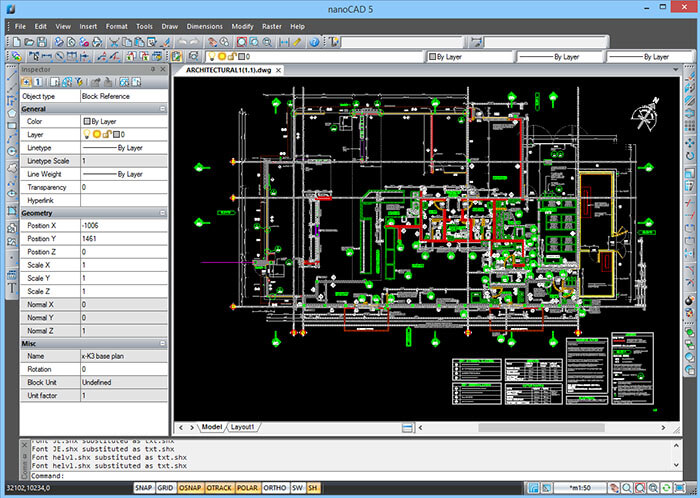
Nano Cad - Best 3D CAD Software

If you are looking for CAD tools that come with the complete “.dwg” support, then Nano CAD is what you are looking for. 

You can enjoy the premium features including SNAP, ONSAP, precision tools along with Command Line Tool. Whether you are new to 3D CAD software or are a professional architect, you would find NanoCAD extremely useful.

Read More: Best Whiteboard Animation Software

The free version comes with several features and provides a good base for the new users thereby making it an excellent 3D CAD software for beginners. But if you are a professional then you need to pay to unlock the professional features.

Nano CAD supports Windows.


2. 3D Crafter
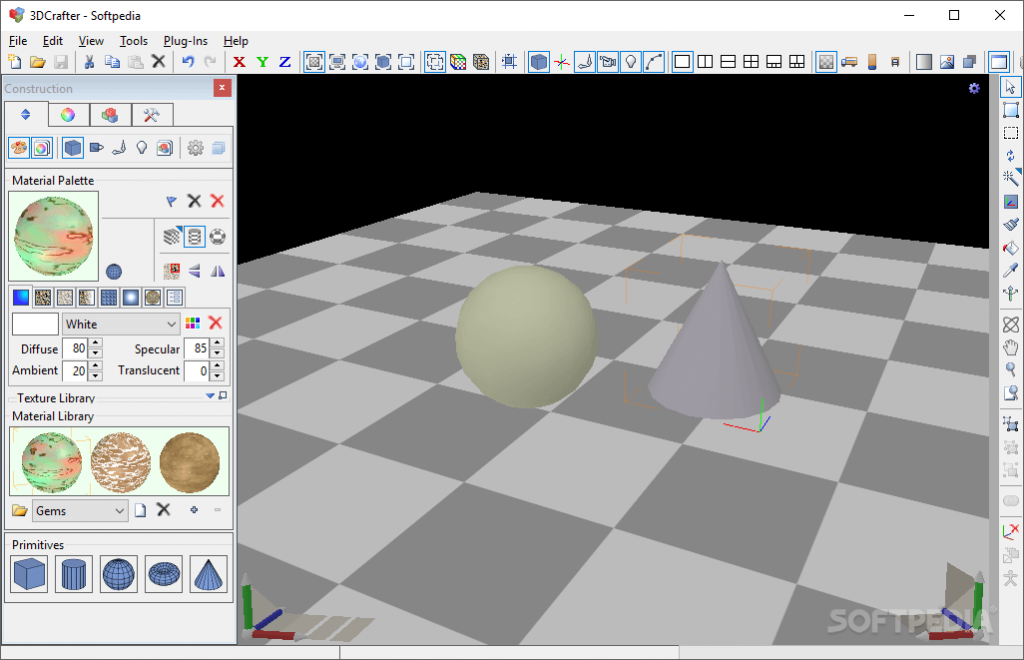
3D Crafter

3D Crafter is a real animation and 3D modeling tool that allows you to plan out your 3D models on the computer. The easy to use drag and drop option is something that makes it a must-have tool.

It comes with built-in 3D shape crafting tools and primitive utilities that help you create complex designs and models easily.

This software also allows you to apply animation and effects on the models and shapes. You just need to place the object at each point thereby, making sure that the animations are smooth.

3D Crafter is compatible with Windows.


3. Adobe Dimension CC
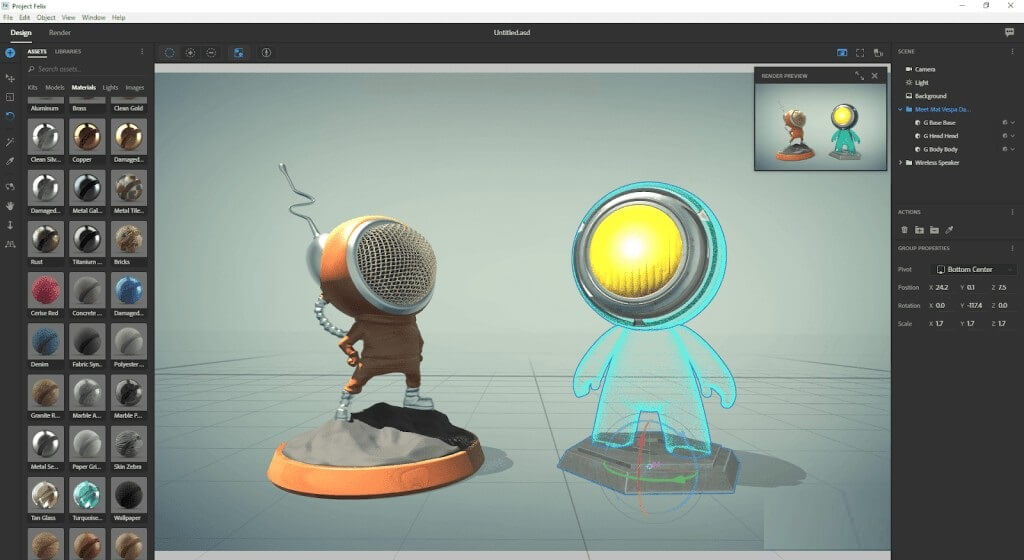
Adobe Dimension CC

Adobe Dimension CC is a part of the Creative Cloud Suite that brings new dimensions into your project and design.

The features such as lighting and high-quality models allow you to build and craft some engaging 3D models easily within seconds. The navigation options along with the drag-and-drop features make this app, one of the best CAD software for 3D printing.

You can easily craft superfine 3D prints using an image or vector graphics onto a model. Adobe Dimension CC delivers unbeatable performance by helping you create realistic three-dimensional images with perfect texture, contour and lighting effects.

Adobe Dimension CC is fully compatible with macOS and Windows 10.


4. Daz Studio
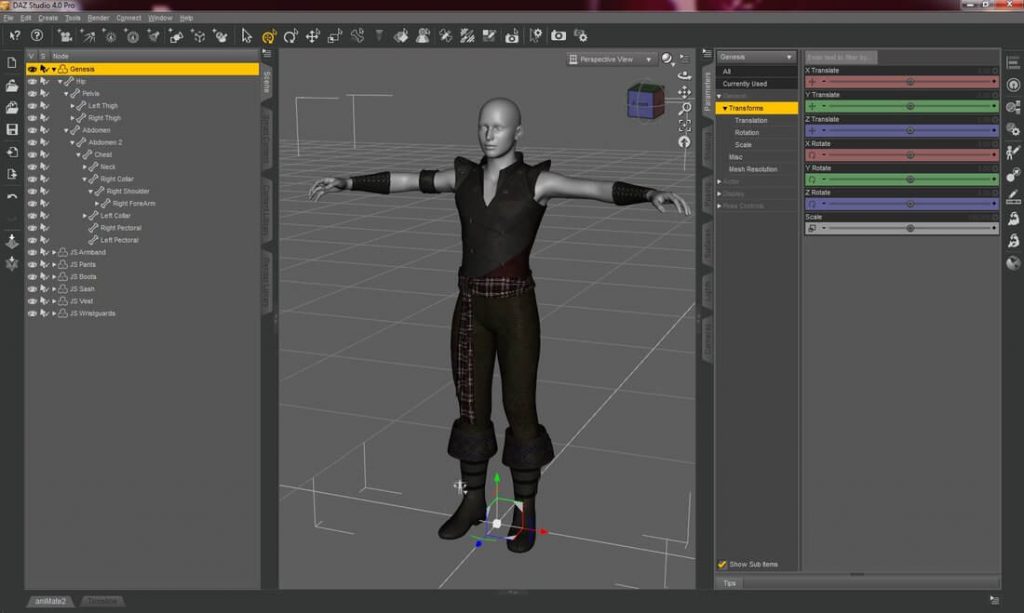
Daz Studio

Daz Studio is a free-to-use 3D CAD software that is full of features and is geared more toward professionals.

Besides these features such as morphing, animation after-effects, and posing, the software also enables you to enhance your skills with a list of in-app interactive tutorials and learning modules.

Daz Studio runs seamlessly well on Windows and Mac OS X platforms.


5. KiCAD
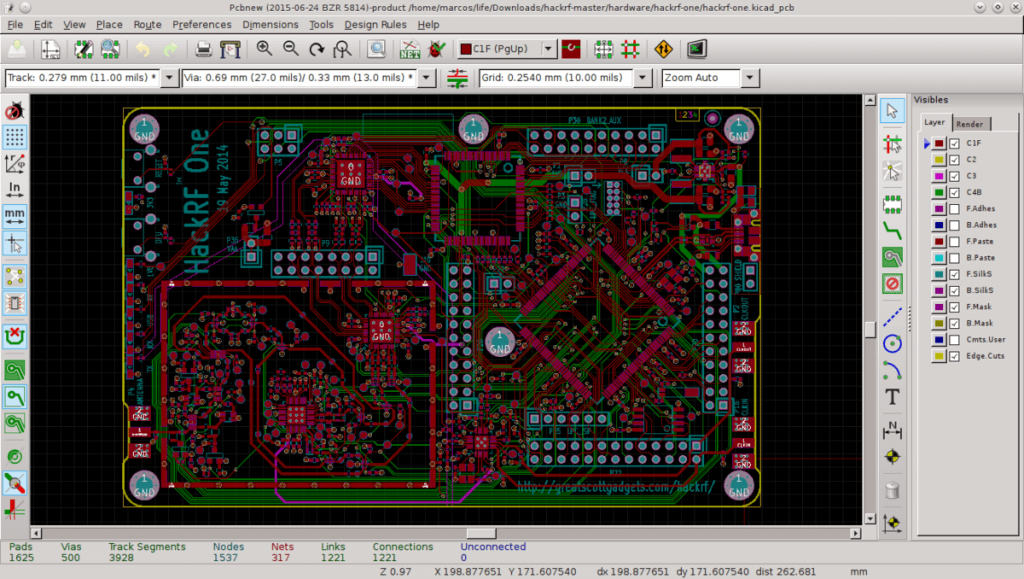
KiCAD

If you are looking for ways to design your next Printed Circuit Board (PCB) then KiCAD will do the job. It is one of the best free CAD software systems that is loved by engineers and electricians around the world.

It is an open-source PCB design software that comes with a built-in project manager and four powerful utilities including a printed circuit board editor, schematic editor, footprint selecting tool, and the GERBER file viewer/editor.

Read More: Best GoPro Editing Software For Windows & Mac

There are a few additional features that include:

  • Two library component editors that allow you to create and edit the schematic components.
  • A 3D viewer and editor to render your PCB in 3D space.

KiCAD performs smoothly on Windows, macOS, Linux, and Ubuntu.


6. Autodesk 3ds Max
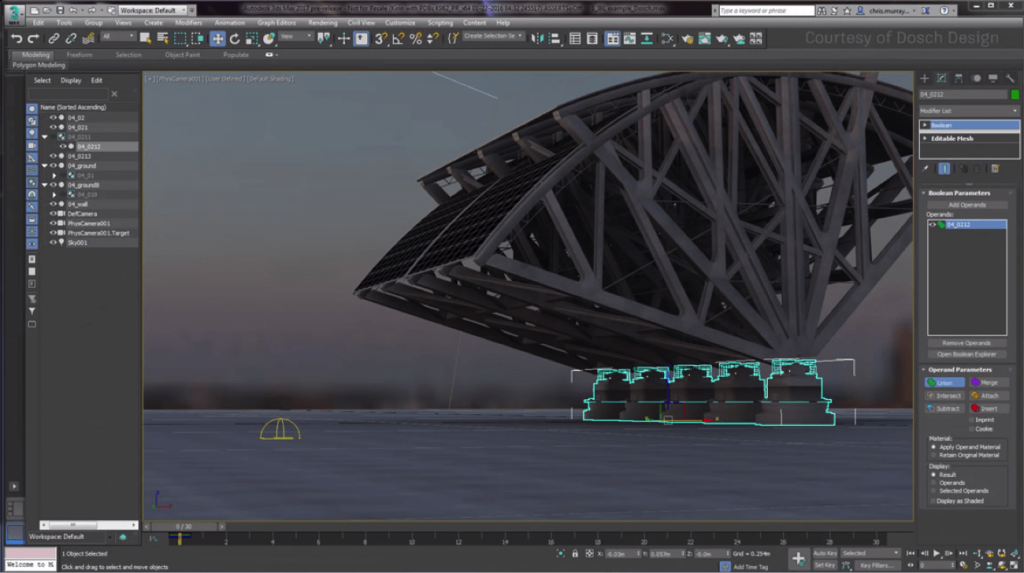
Autodesk 3ds Max

It is a function rendering and modeling program that offers tons and tons of 3D modeling options and tools. You can create, design and animate 3D characters and models for HD games.

This is one of the best 3D CAD software that comes with some features that help you in:

  • Modeling hard surfaces.
  • Applying contour.
  • Creating animations for 3D effects.
  • Applying after effects.
  • Texturing to create superfine designs.

This software comes with many learning modules you can use if you want to learn the basics of 3D modeling.

Auto Desk 3ds Max supports Windows, Linux, and iOS.


7. Solid Works
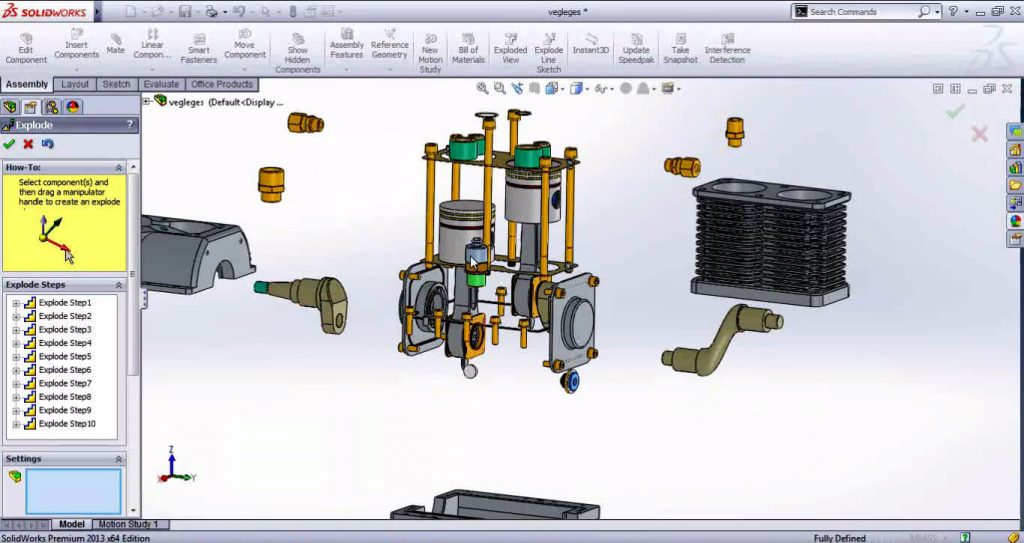
Solid Works

Solid Works is a 3D CAD software that comes with tons and tons of powerful features making it one of the best 3D modeling software.

It is a program that is developed by Dassault Systemes and runs on Windows. If you are new to three-dimensional modeling and design crafting, this software is not for you. A huge collection of tools and tons of features make it a perfect choice for professional artists and architects.

This program is easy to use if you know the depths of designing and modeling. The PDF guides and essential options help you modify the quality of your designs and models.

Solid Works runs smoothly on Windows.


8. Blender
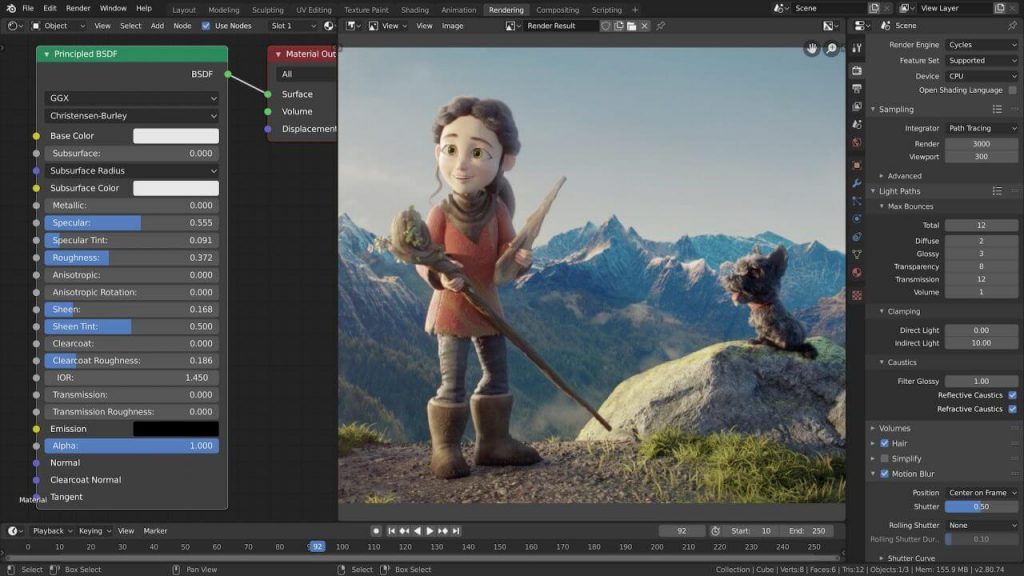
Blender

Blender is a free-to-use open-source CAD software that assists you with 3D designing, shaping and modeling, and rendering functions, thus making it a versatile program.

You can do much more than just handling projects, animations, applying after-effects, three-dimensional printing, and whatnot. This is undoubtedly an excellent CAD software for 3D printing. 

You can also install certain add-ons to unlock several functions, options, and features depending on your assignment.

Blender is highly Windows macOS and Linux.


9. FreeCAD
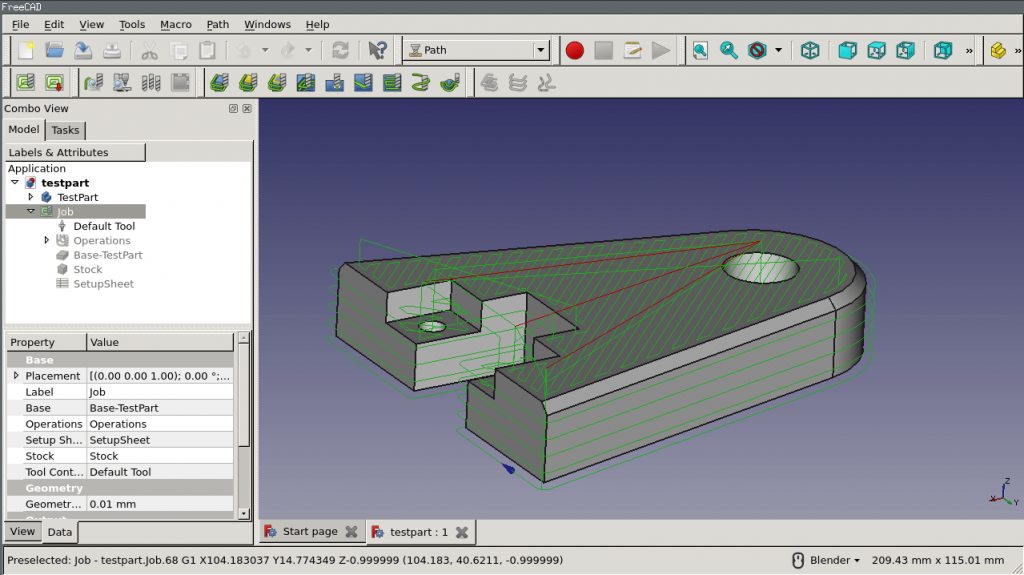
FreeCAD

FreeCad is a 3D CAD program that allows you to design real objects of any size in 3D space. It is a dynamic parametric modeling program and you can easily change the dimensions and parameters of your models or designs using its model history menu.

You can use this software to create:

  • Fantastic 3D characters, locations, and areas for game projects.
  • Architectural models and designs.
  • Animations and after-effects.
  • Industrial designs.

There are some primitive options and features that make FreeCAD one of the best CAD software tools for professionals:

  • Sphere
  • Cone
  • Box
  • Cylinder
  • Torus

It is a multiplatform performer and can process multiple file-formats including DAE, STEP, IFC, OBJ, DXF, STL, and many more.

FreeCAD syncs well with Windows, macOS, and Linux devices.

Read More: Top Best GIF Maker & Editor for Windows 10/8/7


10. Mesh Mixer
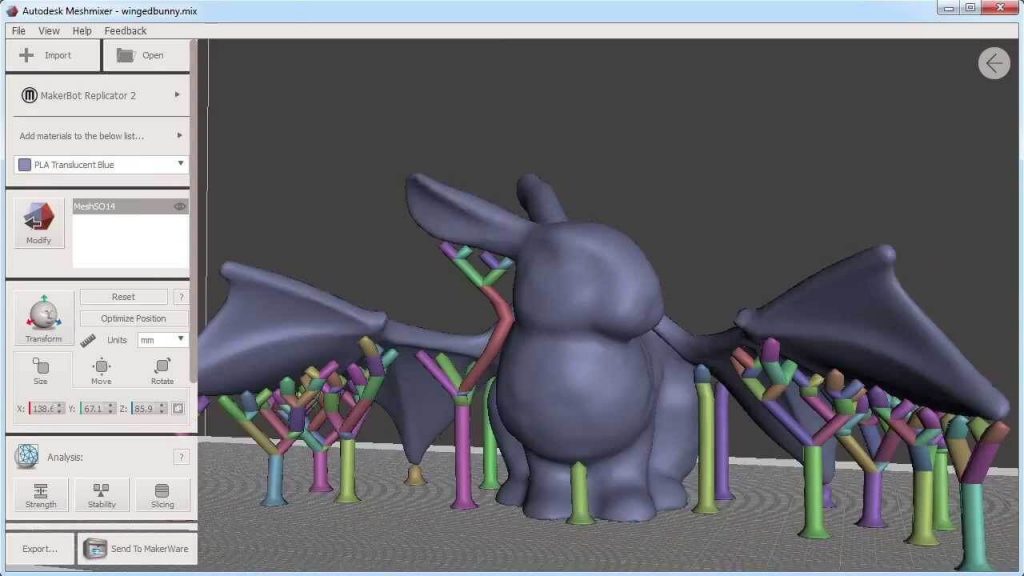
Mesh Mixer

MeshMixer is a top-notch 3D CAD program that you can use for shaping and modeling excellent 3D designs. It is geared more towards handling professional models in 3D space, thereby making it a good choice for artists and architects.

You can also use it to build, edit and modify models from scratch as the program provides all the necessary tools. 

If your assignment is all about 3D modeling, crafting and printing then this program will assist you in your projects. All this makes Mesh Mixer one of the best CAD software for 3D printing.

These are some features it offers:

  • Tools for brushing.
  • Tools for measuring thickness and stability.
  • Mesh smoothing tools.

MeshMixer works well on Windows, Mac OS X, and Linux.


11. Vectary
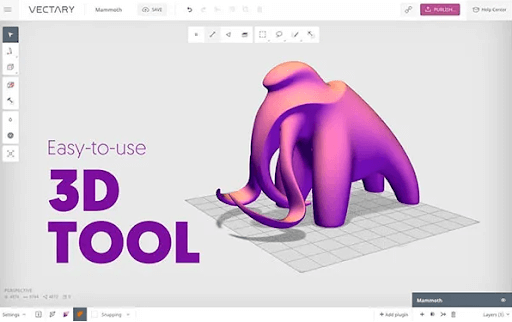
Vectary

The next on our list of best CAD software is Vectary. The web browser-based tool has some advanced features when compared with other alternatives. If you are looking for quick and easy tools for 3D modeling this can be one of the best picks for you. Use the program to customize templates, objects, and projects to create the desired model.

With the Free version of the CAD software, you can create 3 projects. However, if you wish to export these models you must subscribe to their Paid plans. The upgraded version improves the interface and overall functionality of the program.

Also, the educational version of the program is available free of cost for teachers and students.

Features of Vectary:

  • Bring creativity to your 3D designs via Browser without any coding or downloads.
  • Enables users to try existing assets from the huge library to create customized 3D models.
  • Imports are quick without any file size band.
  • Simplifies workflow with a simple and easy interface to concentrate only on your creativity.
  • Add labels, and descriptions, edit colors, and parts, or switch among element libraries depending upon the need of your 3D model.

12. SketchUp
SketchUp

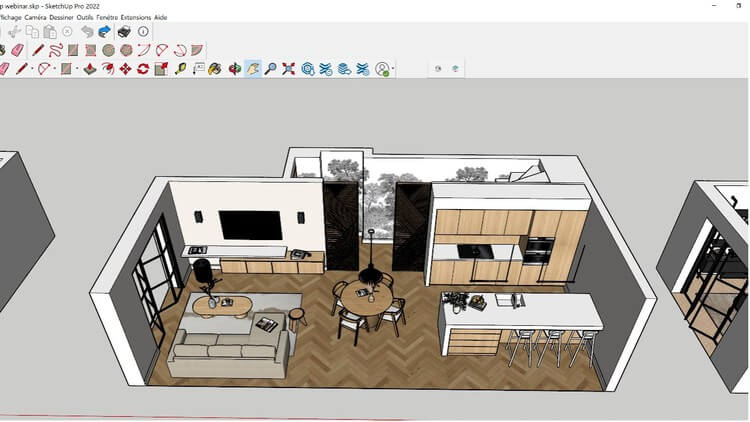
When it comes to 3D modeling, SketchUp is a the Best Free 3D CAD Software that may assist in the creation of both tiny, individualized designs and full-fledged, commercial 3D design projects. Email and telephone help are also available. Additionally, it is available as a mobile application for both Android and iOS smartphones.

With SketchUp’s user-friendly tools, you can easily alter the design geometry and construct a three-dimensional object of any size or form you can imagine. For the purpose of facilitating the generation of design ideas, it offers a 3D model library that contains pre-built templates. When you are presenting your ideas to clients, you may also use animations, movies, and photographs into your designs in order to clarify concepts and exhibit different iterations of a project.

With the assistance of the design tools of this Best Free 3D CAD Software, the program gives you the ability to create three-dimensional models and to personalize the appearance and feel of your projects. It interfaces with virtual reality devices and gives you the ability to examine your projects realistically, which provides you with the ability to identify design errors, prevent expensive changes, and assist customers in evaluating design possibilities.

So these are some best 3D CAD software systems to get if you are a civil engineer, architect, graphic designer or a 3D artist.


Bonus 3D CAD Software

Based on the recommendations and user ratings from our study we are also revealing an excellent CAD software for 3D printing. 

3DReshaper
3DReshaper

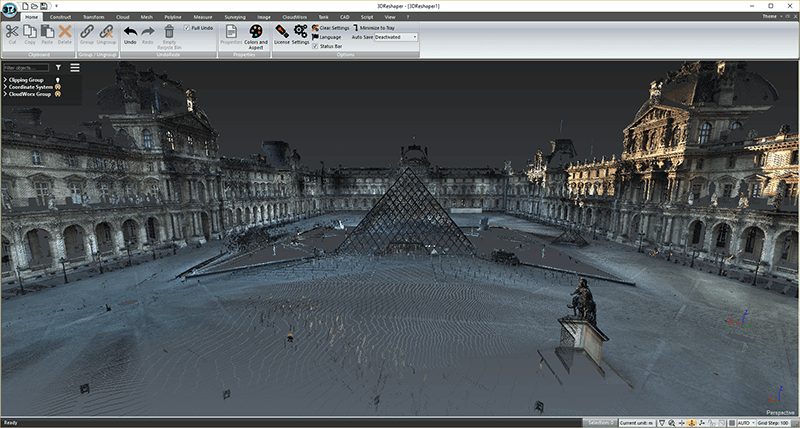
3DReshaper is a wonderful 3D CAD program that helps you in processing the models. If you are a professional artist with years of experience in modeling, after-effects, and three-dimensional printing then this is the program you are looking for.

It is a flexible app that caters to several industries including shipbuilding, automobile, civil engineering, arts, gaming, and many more sectors. It packs a punch of features and supports several scripts for hassle-free modeling.

If you are interested in getting an app that can save your time and assist you in your complex projects, then this is one of the best CAD software for 3D printing

This is a unique program that easily processes 3D point clouds from various sources including:

  • Digital devices.
  • Laser scanning.
  • 3D scanners.
  • Other sources such as UAVs.

Since point-cloud processing is the most difficult step to manage and handle, the software offers powerful tools and functions such as Automatic Segmentation to manage and process point clouds and Fusion to simplify your tasks.

3DReshaper works perfectly fine on Windows 10.


Conclusion

This brings an end to our guide and concludes the list of best CAD software. It is difficult to answer which CAD software is the best as each of the above-mentioned programs comes with its own set of advantages and useful features. 

It is worth suggesting that running animation and 3D effects on your computer require powerful hardware.  Most of the apps discussed in this guide are free and are undoubtedly the best CAD software tools for professionals that will assist you in your assignments and projects. We hope that you select the program that suits your needs and works the best for you.

Author

Jay Galiyal

Jay is an incredible writer who loves to give life to words. He is always carrying out some research and likes to keep himself updated with the happenings around him. Writing runs in his blood makes him happy. When not working, you can find him singing, composing poetry, writing horror stories, playing action games on the laptop and munching on food.

View all posts

Related Posts
Best-McAfee-alternative-software-to-use-for-Virus-Protection

Best McAfee Alternative Software to use for Virus Protection

February 11, 2026
0

Buying a laptop might be expensive, but protecting it is not. Choosing the right and trusted antivirus software is as necessary as choosing the model of the laptop.

When it comes to trusted antivirus programs, many people think of McAfee right away. It is one of the oldest antivirus software programs, but with limited features. So, you can also use other McAfee alternatives that provide maximum security with some additional features.

In this blog, we will tell you about the best McAfee alternative that can be a game-changer for your laptop, but first, let’s understand what antivirus software is.

What is Antivirus Software?

The antivirus software is installed in laptops to prevent, detect, and delete the malware, commonly known as a virus, that can be a threat to or compromise your privacy. There are many different kinds of malware, like ransomware, that encrypt files and steal your data.

Another is spyware, which hides itself in your operating system and tracks your activity.

There are many alternatives to McAfee in the market that give the best protection to your system from the above-discussed threats.

What to look for in McAfee Alternatives?

In the market, there are many alternatives to McAfee that provide different features. A good antivirus must have key features for smooth working and protection that you should check.

Before purchasing a McAfee replacement, ensure these features:

  • Real-time detection and protection
  • Ransomware and spyware protection
  • Automatic and manual scans
  • Compatibility with different devices
  • Works on all Windows, Mac, Android, iPhone/iPads
  • VPN, password, and parental control
  • High protection score and certified

Let’s move to the best McAfee alternatives for antivirus protection.

Best 5 McAfee Replacements

Given are not just replacements, but they are McAfee competitors that give the same features and even more than McAfee itself. Let’s explore each one by one.

1. Bitdefender

It is one of the best free antivirus software programs. It gives completely free protection forever from threats like Ransomware, Infected downloads, Phishing, and even rootkits and Trojans that are difficult to detect. This software was awarded the Top Product badge with an excellent score in three categories of testing.

Bitdefender

Why Bitdefender?

Choosing this as a McAfee alternative is a smart move due to the mentioned reasons:

  • It keeps you informed about your system without bothering you, unlike other antivirus software.
  • It performs daily scans automatically and resolves issues if anything is detected without compromising the system’s performance.
  • It is certified by many organizations.
  • It also provides a 30-day money-back guarantee.
  • This software provides 100% free protection with no hidden costs and no trials.
  • A major eye-catching feature is that it provides advanced defense against threats and informs you about threats when necessary.

Pros

  • It has a powerful yet simple interface.
  • Among all McAfee competitors, Bitdefender recorded high scores from independent and third-party testing labs.
  • It gives protection against ransomware threats.
  • It does not impact the performance of the device while running.
  • It provides more protection than other alternatives in the Free version.

Cons

  • Offer a few features in a free subscription plan.
  • Do not provide safe online banking without a Plus version

Explore Now

Also know: Best Kaspersky Antivirus Alternatives for Windows


2. Avast

Another good McAfee competitor in antivirus software on a budget is Avast. It is one of the oldest antivirus software providers in the industry. Even without a premium, you get protection from cyberthreats and digital scams. Avast is now offering new AI-powered anti-scam guidance along with safe browsing and emailing. Many McAfee alternatives give more features to premium users, but Avast reserves a few features for them.

Avast Free Antivirus

Why Avast?

  • Provides 5GB per week of VPN protection available in the free plan.
  • Protects your firewall without a premium or any paid plan.
  • Ransomware protection and Trojan detection.
  • It has a 97% detection rate in malware blocking tests.
  • This alternative provides a 99% detection rate in phishing tests.

Pros

  • Free protection for all Windows, Mac, Android, and iOS.
  • Provides sound virus scans.
  • It performs behaviour-based detection
  • Easily installed and run.
  • Provide special features like a Wi-Fi network scanner for free.
  • Provides real-time protection and ensures regular updates.

Cons

  • High CPU usage while performing scans.
  • Do not remove viruses in a free plan.

Explore Now


3. AVG

AVG is another powerful McAfee alternative in the antivirus industry. While other software has 9 to 9.5 lab scores, AVG is the only software with 10 scores from two different labs. It is available for Windows, Mac, Android, and iOS.

AVG Antivirus

Why AVG?

  • Automatic filters incoming and outgoing traffic and protects it from threats.
  • Includes internet security, VPN protection, location services, and insights.
  • Continuously rated best by industrial experts and third parties.
  • Awarded for blocking 2.4 billion cyberattacks in 2024.
  • In this, scans can be scheduled.

Pros

  • Provide free ransomware protection.
  • More security for free, but naturally, not everything.
  • Ability to perform scans when the devices’ performance is slowing down.
  • 100% detection score in phishing detection test.
  • Give an email shield for free.
  • Able to perform behavior-based detection.

Cons

  • Vulnerability scans are not available.
  • The system gets slow when you perform full-system scans.
  • Remove viruses only when you pay or subscribe to a plan.

Explore Now


4. Malwarebytes

Another top McAfee alternative on our list is Malwarebytes. It shows a 99.5% protection score, but one important thing is that it is a virus removal tool. It offers free elimination of viruses, spyware, and ransomware attacks.

Malwarebytes

Why Malwarebytes?

  • Outstanding performance in detecting and removing viruses.
  • Also, provide a browser extension, browser guards, and ad blocking.
  • Protection from phishing attempts.
  • It costs you yearly and offers a 60-day money-back guarantee.
  • Compared to other competitors, it provides a wide range of protection to its premium users.

Pros

  • It takes less time to scan for viruses.
  • Offer low CPU usage when it is running.
  • It removes malware for free.
  • It shows excellent cross-device compatibility.

Cons

  • Unlike other alternatives, it does not offer a VPN and password manager.
  • It did not contain real-time protection.
  • This is free for Windows, but a paid version for macOS, iOS, and Android.
  • Advanced features that most of the alternatives provide are unavailable in the free version.

Explore Now


5. Norton 360

It is an excellent McAfee alternative that provides cloud storage. Antivirus is just a part of its cybersecurity package. It is highly recommended if you are looking for more features than just antivirus protection. So if you want software for your Windows, macOS, or iOS, then go for this alternative.

Norton-360-Deluxe

Why Norton 360?

  • Users get 2 GB of cloud backup for files and passwords in the entry plan.
  • It protects your device with 99.5% real-world protection results.
  • Awarded the Top Product badge in August 2025.
  • In 360 suites, you will get VPN, dark web monitoring, parental control, and much more compared to other alternatives of McAfee.

Pros

  • It takes less time for a quick scan, a full scan, and a smart scan.
  • It contains AI-powered scam protection, which keeps you away from spam websites.
  • It gives super detection of malware.
  • Offer a 60-day money-back guarantee for all plans.
  • The automatic update feature ensures the device is safe and secure.

Cons

  • It sometimes slows down the installation of other apps because of scanning.
  • Occasional pop-ups and notifications may appear in between your work that can be annoying.
  • This alternative has plans that are a bit more expensive as compared to others.

Explore Now

Also know: Best Lightweight Antivirus for Windows

Here are some of the best McAfee alternatives that we have discussed in this blog that protect your device from viruses for free. And if you need more protection for more devices, they offer more plan options, which you can opt for. It is important to keep your things safe and protected from malware. For more information, visit the official website.

Best Startup Manager Apps for Mac

8 Best Startup Manager Apps for Mac in 2024

January 1, 2024
2

Know some best startup manager apps for Mac to speed up the overall performance of your macOS. Read on the entire write-up for complete details. 

Every time you start your Mac, numerous services, apps, and background running processes (also known as login items) begin to run automatically. But sometimes, useless apps and processes also add up to this list, which maximizes the bootup time of your Mac and reduces the performance. These startup or login items load without the user’s permission when you boot your MacBook and make your Mac function slower.

In addition to this, such items are deleted from Startup but they also leave a broken or missing link that causes an error pops-up and the system to crash. This sounds really annoying, but luckily there are various startup manager programs available for Mac, that help you disable the unwanted startup items to speed up your Mac’s performance and make it more efficient.

8 Best Startup Manager Programs for Mac in 2024

Using any of the below-mentioned Mac startup manager programs, you can make sure that your Mac runs smoothly and is in good shape.

1. CleanMyMac X

CleanMyMac X

CleanMyMac X is a perfect all-in-one startup manager app for Mac. It cleans megatons of system junk and makes your machine run faster. The system optimizer can be anything you tell it to be, a performance monitor, malware or virus remover, a macOS cleaner, and more.

It searches for the junk in all the corners of your Mac. And, cleans useless files, like obsolete cache data, broken downloads, unneeded localizations, and logs. Using this tool, you can delete tons of clutter that lurks in Mail, Photos, iTunes, and even find GBs of huge hidden files.

Key Features of CleanMyMac X:

  • Quickly remove your browsing history, along with offline and online activity traces.
  • Run an in-depth check-up of your Mac for all kinds of vulnerabilities.
  • Make your Mac 2.5x more responsive.
  • Better and faster boot time.

Downlaod Now

Also Read:Hidden Features Of MacBook You Should Know


2. MacReviver

MacReviver

As its name suggests, MacReviver is the best way to restore the optimum performance and stability of your Mac. It is a simple to use and lightweight tool designed to help you maintain and optimize your MacBook without any hassles. This startup manager for Mac incorporates all the necessary tools to help you clean, optimize and manage your machine in order to ensure its smooth working.

Moreover, the software also has a special Anti-Theft Protection feature that provides you with an added layer of security against any malicious threat to your Mac. The tool comes in two models i.e., free and pro versions. The free version comes with basic or limited features, whereas the pro version unlocks the complete potential of the utility.

Key Features of MacReviver:

  • Detect and delete duplicates that cover valuable disk space.
  • Maintain your battery by setting up the battery usage profiles.
  • Look for different file types based on the size and other characteristics.
  • Automatically creates a system restore point to securely roll back modifications to a previous condition.
  • A special feature to track down your stolen MacBook.
  • Comes with a default uninstaller to safely uninstall apps, preferences, widgets, and plugins.

Download Now


3. CCleaner For Mac

CCleaner For Mac

If you are experiencing a slow-running Mac, you can use CCleaner for Mac to get rid of all the unused files and collected junk. Not just for Mac, the CCleaner works the same for both a Mac and PC. Additionally, it also allows you to clean your recycle bin, broken permissions, temporary files, and folders, and so on. The Mac cleaner provides a different module to keep startup items organized. That means, with the help of that module, you can easily disable the startup items that are unproductive and increase the response time of your Mac.

Key Features of CCleaner for Mac:

  • Straightforward user interface.
  • Efficient and thorough cleaning of the browser and the system.
  • Unlike others, CCleaner for Mac is an ideal tool for repairing broken permissions.
  • Lets you exclude particular files and folders from scanning.
  • Reduce clutter and speed up the boot times.
  • Real-time protection from malware and viruses.

Download Now


4. MacBooster

MacBooster

Lives up to its name, MacBooster is a dedicated tool to boost the overall speed and performance of the Mac machines. This is an excellent utilization tool that aims at strengthening and protecting your machine from malware, viruses, and other malicious threats. This Mac optimizer and startup manager is very easy to use and it boasts a user-friendly interface.

In just a few simple steps, you can find the Startup items that you don’t need and can easily disable them one by one. By disabling the unnecessary startup items you can enhance Mac’s productivity.

Key Features of MacBooster:

  • Real-time activity monitoring.
  • Thorough and deep cleaning of junk and duplicate files.
  • One-stop Mac maintenance tool to protect your Mac from malware and virus.
  • It optimizes Mac hard disk and fixes all disk permission-related issues.

Download Now

Also Read: Best Mac Disk Space Analyzer 


5. MacKeeper

MacKeeper

MacKeeper is all you need to keep your Mac in tip-top shape. MacKeeper is well-known for its 3M concept – More space, More speed, and Maximum security. With the help of this startup manager for Mac, you can keep your Mac clean and safe with zero effort. The software has everything you need to supercharge your Mac performance.

It can effortlessly tune up your Mac’s performance by detecting and removing malware while deleting the system junk and can do a lot more than you have ever expected from any Mac optimizer. Mac users can use MacKeeper to clean duplicates, junk, and unwanted apps or files to save GBs of disk space.

Key Features of MacKeeper:

  • Provides real-time protection by instantly blocking threats (malware and adware) with an impressive 99.7% protection rate.
  • Frees up an ample amount of space on Mac by removing similar/duplicate files, cache data, and useless applications.
  • Offers ad-free browsing by monitoring 24*7 for passwords or data breaches.
  • Comes with several essential tools for a better and faster startup time, automatic app updates, and more.

Download Now


6. TuneupMyMac

TuneupMyMac

TuneupMyMac is an expert and easy-to-use solution for MacBooks. It provides a simple way to clean, secure and optimize your Mac in order to keep it running smoothly and effectively. This system optimizer for Mac can be used to disable the startup items on the Mac machine. TuneupMyMac’s advanced features and robust tools help increase Mac speed with ease and improve the overall user experience.

This amazing startup manager helps you deal with the automatic application launch during the Mac startup. Using this tool, you can discover, disable, enable or add startup items pretty easily & quickly. However, in order to get access to all the features of TuneupMyMac, you’ll need to upgrade to its paid version. Because the free version comes with limited features.

Key Features of TuneupMyMac:

  • Enables you to clean your Mac machine in a single click.
  • Removes junk files and frees up a huge amount of space on your hard drive.
  • Possesses unique and powerful tools to perform multiple tasks at the same time without interfering with one another.
  • Lightweight and user-friendly startup manager for Mac machines.

Download Now


7. OnyX

OnyX

Is your Mac running slow? No need to panic, just try OnyX to clean up and organize your MacBook. It is promoted as one of the best startup manager apps for Mac that you can use to disable the unnecessary startup items occupying a lot of resources that are making your Mac lethargic.

It is a trusted application that boasts a clean interface to several tasks that would otherwise need complex commands to be typed utilizing a command-line interface. Not just that, but it can also be used to rebuild numerous databases and indexes.

Key Features of OnyX:

  • Completely free to use Mac startup manager.
  • Easily manage startup items to delete specific erroneous folders and files and remove system caches.
  • It can run miscellaneous maintenance and cleaning tasks.
  • Configures parameters in the Dock, Safari, Finder, and some other Apple apps.

Download Now


8. Mac Optimizer Pro

Mac Optimizer Pro

Last but not least, Mac Optimizer Pro is another best startup manager for Mac that you can consider to keep your Mac clean. It is a consumer-certified speed booster for Mac. Increase the performance of your Mac machine with its wide range of powerful features that guarantee superior performance.

Mac Optimizer Pro is an ideal solution for tuning, tweaking, and optimizing your Mac for faster and better performance. In addition to this, the module of its Login items helps you monitor and manage the programs and applications that start while you boot your machine.

Key Features of Mac Optimizer Pro:

  • It has built-in incredibly powerful and fast disk utility.
  • Keep your MacBook in good shape by automatically checking for issues.
  • Military-grade file shredder powered by multiple-overwrite technology. The file shredder helps you easily clean up your Mac, and free disk space, without compromising your privacy.
  • Quickly detects and fixes the issues that lead to poor or sluggish performance.

Download Now

Also Read: Best Uninstaller for Mac to Completely Remove Unwanted Apps


Best Startup Manager Apps for Mac in 2024: Closing Words

Startup items certainly make your Mac slower than expected. But there is no need to get taken away with these startup items. Startup manager apps are here as your savior. The best startup manager apps for Mac help you to optimize your Mac and manage the startup items. With the help of the above-mentioned apps, you can hassle-free manage and disable the unwanted startup items on your Mac.

If you have any better suggestions, then please do tell us in the comments box below. Share your doubts or questions with us in the comments section below.

If you find this article helpful, then share it with your friends and family who are experiencing the same issue as you with their Mac. For further information, do subscribe to our Newsletter. Additionally, follow us on Facebook, Twitter, Instagram, and Pinterest

1 Comment
    Despina Umphenour says: Reply
    December 26th 2020, 2:47 am

    Fantastic website. Lots of helpful info here. Thanks for sharing!!

Leave a Reply Cancel reply

Your email address will not be published. Required fields are marked *

Sidebar Image bit G ad1

Latest Posts

  • Best Ways to Fix Facebook Session Expired Loop Error  (1)
    Best Ways to Fix Facebook Session Expired Loop Error 
    by Gunjita Sompura / April 28, 2026
  • React vs Vue
    React vs Vue Detailed Comparison in 2026
    by Gunjita Sompura / April 23, 2026
  • Top Image Resizing software for Windows PC 
    by Dikshika Singh / April 21, 2026
  • How-To-Download-and-Install-Windows-Fax-And-Scan-In-Windows-11
    How To Download and Install Windows Fax and Scan in Windows 11
    by Dikshika Singh / April 15, 2026
  • How-To-Run-Control-Panel-As-Administrator
    How To Run Control Panel as Administrator in Windows 10/11 
    by Dikshika Singh / April 14, 2026

Categories

  • Cyber Security
  • Driver Updater
  • Entertainment
  • Fitness
  • Games
  • How To
  • laptop
  • OS
  • Reviews
  • Tech News
  • Tips & Tricks
  • Top 10
Sidebar Image bit G ad1
Best PDF Search Engine Sites to Get Free PDF eBooks 11 Best PDF Search Engine Sites Get Free PDF eBooks in 2024by Harshita / December 28, 2023
16 Best File Compression Software in 2024 [Top File Archiver]by Prachi Dani / December 28, 2023Best File Compression Software in 2021
TechPout Footer Logo

We at TechPout promise to put forth stories that help people to learn and simplify their digital life. Our purpose is to share the true essence of technology with our tech-loving community.

Useful Links

  • About Us
  • Contact us
  • Privacy Policy

Popular Posts

  • Best PC Optimizer Software
  • Best Mac Cleaner Apps
  • Best Driver Updater
  • Duplicate Photo Finder and Cleaner Software
  • Best Free Movie Download Sites
  • Best IPTV Players

Follow us

Copyright © 2026 www.techpout.com. All rights reserved
DMCA.com Protection Status